
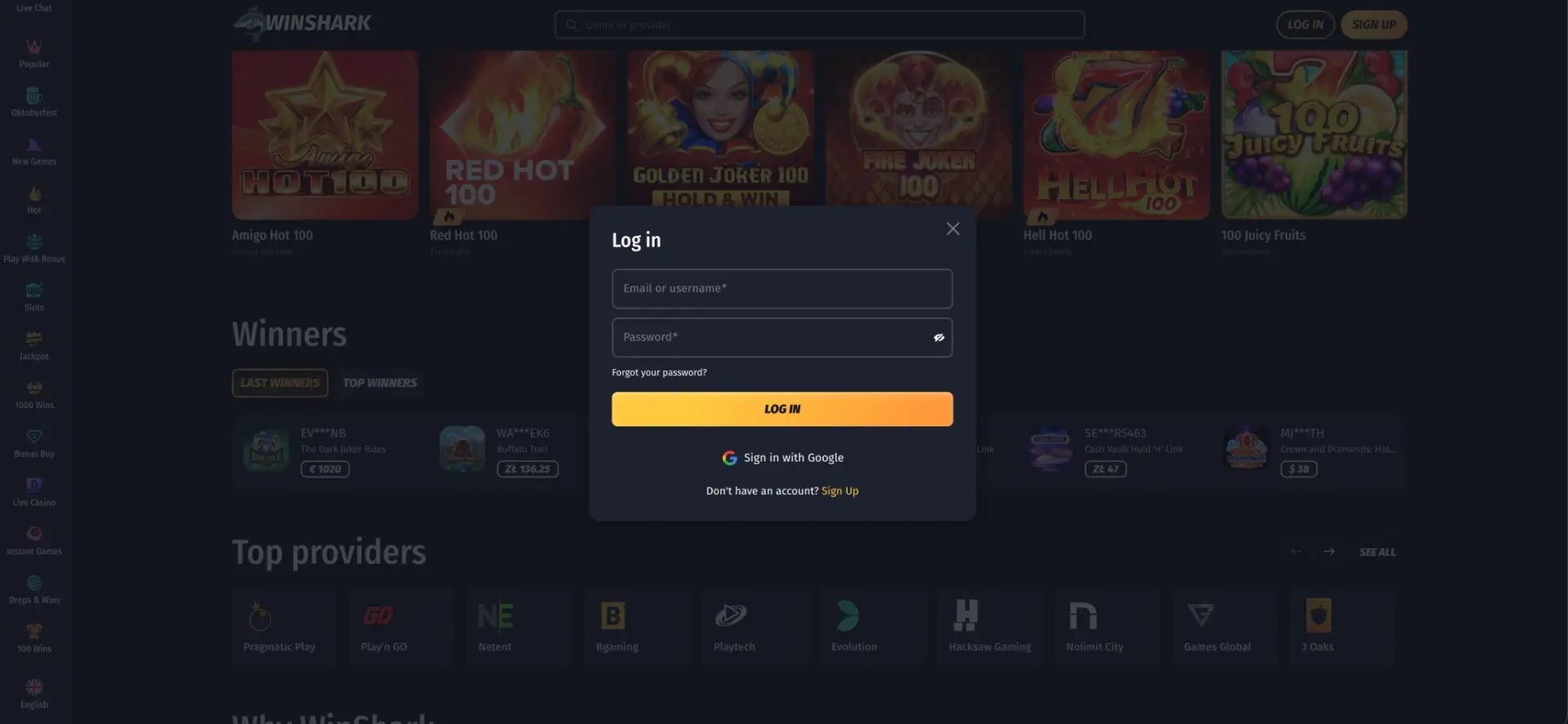
Winshark casino login is done through the LOG IN button in the upper-right corner of winshark com: enter the email address or username and the account password, then click LOG IN. Accounts created with Google can sign in with one click through Sign in with Google, and a lost password is restored through the Forgot your password? link, which sends a reset message to the registered email. The same login works on desktop and in mobile browsers on iOS and Android, as Winshark has no separate app with its own credentials.
After signing in, the account gives access to the AUD balance, the Wallet for deposits and withdrawals, active bonuses, the daily Treasure Map, the Shop, Loyalty Club progress and live chat with support. The sections below cover the login process step by step, password recovery, common errors and the verification checks linked to the account.
| Login essentials | Details |
|---|---|
| Where to log in | LOG IN button, upper-right corner of winshark com |
| Login details | Email or username + password |
| Social login | Sign in with Google |
| Password reset | "Forgot your password?" link in the login window |
| Device support | Desktop and mobile browsers, iOS and Android |
| Session security | Encrypted connection, account-only access to payments |
| When verification appears | Before the first withdrawal or on request from the payments team |
| Currency | AUD |
| Support | 24/7 live chat, email |
How to log in to Winshark casino
The login window opens as a pop-up on top of the current page, so the lobby or game that was open stays in place after authentication. Both the email address and the username chosen in the profile are accepted in the first field.
Step-by-step login
The full sequence takes a few seconds once the account exists:
- Open winshark com in a browser.
- Click LOG IN in the upper-right corner of the page.
- Enter the email address or username in the first field.
- Type the password; the eye icon shows the characters to check for typos.
- Click LOG IN and wait for the balance to appear in the header.
Sign in with Google
Accounts registered through Sign Up with Google do not have a separate Winshark password at first. For these accounts, the Sign in with Google button below the main form is the correct way to log in. Entering the Google email in the regular form without a password will not work, which is one of the most common reasons for a failed first login.
No account yet: quick Winshark registration
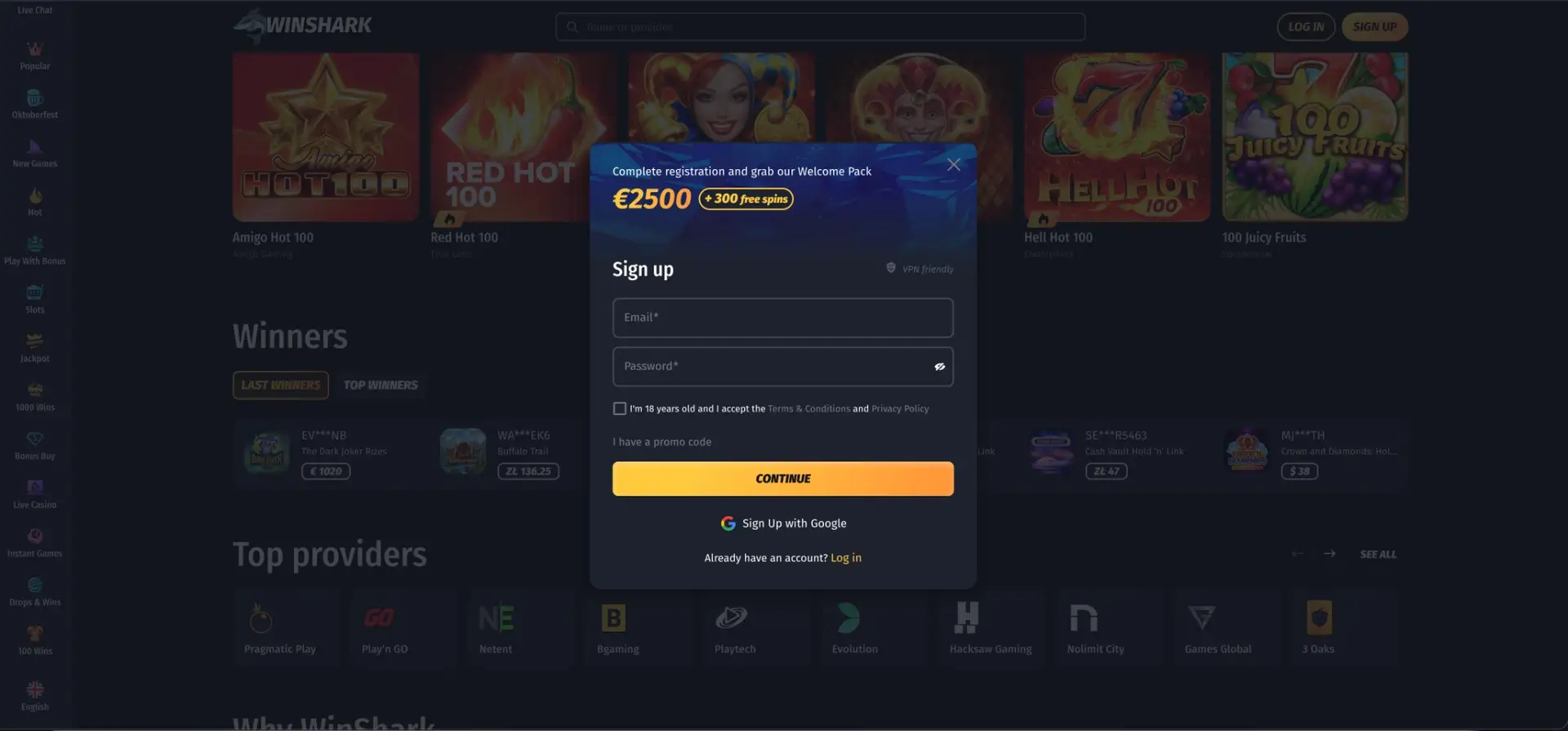
The login window has a Sign Up link at the bottom for players who have not yet created a profile. Registration asks only for basic details at the first step, and personal information is added later in the profile.
Registration flow
The sign-up form works in the following order:
- Click SIGN UP or the Sign Up link in the login window.
- Enter an email address and create a password.
- Tick the box confirming age 18+ and acceptance of the Terms & Conditions and Privacy Policy.
- Click I have a promo code if you have one, and enter it.
- Click CONTINUE to create the account, or use Sign Up with Google.
The home page also has a short sign-up form next to the main banner with the same fields and a JOIN NOW button. After registration, the account is already logged in, and the Welcome Shark bonus can be selected with the first deposit.
Secure login practices
The account holds both money and personal documents, so a few simple habits reduce the risk of unauthorised access:
- Use a password that is not used for email or other gambling sites.
- Type winshark com manually or use a saved bookmark instead of links from unknown messages.
- Do not let the browser save the password on shared or work devices.
- Log out after each session on a public computer.
- Keep the email account linked to Winshark protected, as password resets are sent there.
Winshark password recovery
A forgotten password does not block access to the balance. The reset is done entirely by email and does not require contacting support.
Reset steps
To set a new password:
- Click LOG IN and then Forgot your password? under the password field.
- Enter the email address used at registration.
- Open the reset message from Winshark, checking the spam folder if it does not arrive.
- Follow the link and create a new password.
- Return to winshark com and log in with the new password.
If the registered email is no longer accessible, the reset link cannot be received, and the account has to be restored through live chat with proof of identity.
Winshark casino login on mobile
The mobile version uses the same accounts and the same login window as the desktop site. The LOG IN and SIGN UP buttons stay in the header, and the side menu collapses into a compact panel on smaller screens.
Tips for mobile
A few settings make mobile access faster:
- Add winshark com to the home screen, so the site opens with one tap.
- Allow the browser's password manager to fill in the details on a personal phone.
- Use Sign in with Google if the account was created that way, as it skips typing.
- For the Bonus Wheel, link the Telegram app on the same phone.
Troubleshooting common login errors
Most login problems at Winshark have simple causes that can be fixed without support. The subsections below cover the typical cases.
Incorrect credentials
An error after clicking LOG IN usually means a typo in the email, username or password. The password is case-sensitive, so Caps Lock and automatic capitalisation on phones are frequent causes. Showing the password with the eye icon helps spot the mistake. If the account was created through Google, the regular form will not accept a password that was never set.
Browser or cache issues
When the login window opens but nothing happens after submission, the problem is usually in the browser:
- Clear the cache and cookies for winshark com and reload the page.
- Turn off extensions that block scripts or pop-up windows.
- Update the browser or try another one, such as Chrome, Safari or Firefox.
- Switch from mobile data to Wi-Fi or the other way round.
Reset email not arriving
Reset messages can land in spam, promotions or social tabs. If nothing arrives after several minutes, the email entered may differ from the registered one, for example a work address instead of a personal one. Live chat can confirm which address is linked to the account.
Account restricted
Access can be limited when a cooling-off period or self-exclusion is active, when verification documents are pending, or when the account is under a security check. Self-exclusion cannot be lifted before the selected period ends. In other cases, live chat explains the reason and the documents needed to restore access.
What is available after Winshark login
Once signed in, the account menu and sidebar open all personal sections of the casino:
- Wallet - Deposit, Withdrawal and History tabs in AUD.
- My Bonuses - credited bonuses waiting for activation and wagering progress.
- Treasure Map - the bonus and promo code of the current day.
- Shop - coin balance and rewards, available only after login.
- Loyalty and Achievements - current level, rank, XP and tasks.
- Settings - personal details, limits and the Time Track Notification.
- Live Chat - direct contact with support.
Account verification (KYC)
Verification at Winshark is linked to withdrawals rather than to login. An unverified account can deposit and play, but the first payout is processed only after the identity checks are completed. The payments team may also request documents later, for example after a large win or a change of payment method.
The usual set of documents includes:
- A government-issued photo ID, such as a passport or driver licence.
- Proof of address dated within the last few months, such as a utility bill or bank statement.
- Confirmation that the card, e-wallet or bank account belongs to the account holder.
Name, date of birth and address in the profile should match the documents exactly. Uploading clear copies before the first withdrawal request shortens the waiting time for the payout.
FAQ about Winshark casino login
Short answers to the questions Australian players ask most often about access to the account.
How do I log in to Winshark casino?
Click LOG IN in the upper-right corner of winshark com, enter the email or username and password, and click LOG IN. Accounts created with Google use the Sign in with Google button.
Can I log in to Winshark with my username?
Yes. The first field of the login form accepts either the email address or the username.
What should I do if I forgot my Winshark password?
Click Forgot your password? in the login window, enter the registered email and follow the link in the reset message to set a new password.
Is the Winshark casino login the same on mobile?
Yes. The mobile site uses the same account and login form, and the balance, bonuses and loyalty progress are shared between devices.
Why can't I log in after registering with Google?
Accounts created through Google do not have a separate password by default. Use the Sign in with Google button instead of the regular form.
Do I need to verify my account to log in?
No. Verification is required before withdrawals, not for login. It is still worth completing early to avoid delays with the first payout.